
UrbanSitter: Find Child Care
UrbanSitter Inc.Parenting
3.5697.00 Reviews
- Version
- 13.10.0(16774)
- Installs
- 100.00K
- Age Rating
- Everyone
Screenshots
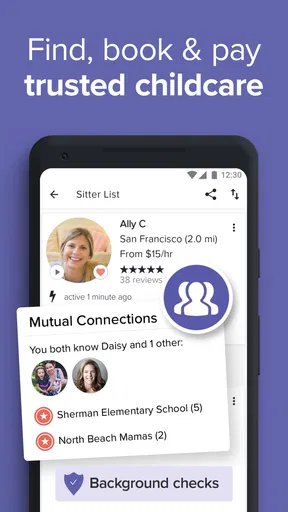
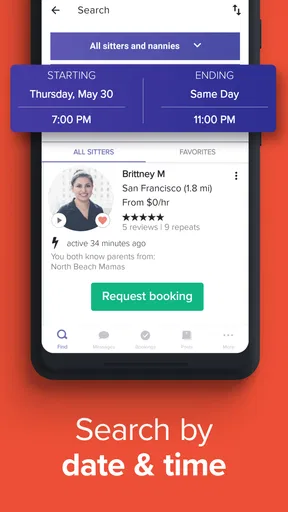
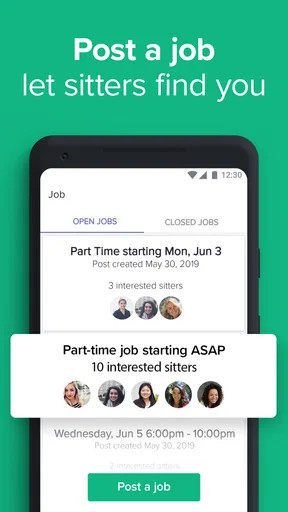
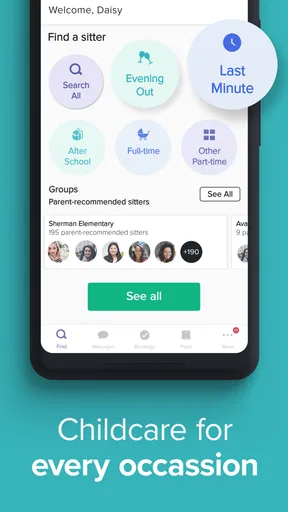
Our Review of UrbanSitter: Find Child Care
 Analysis by Appyee
Finding someone to care for a child is not the same as ordering an ordinary service. I want to know who I am contacting, how quickly they can respond, whether the arrangement fits my family, and how much work remains before I can leave the house with confidence. UrbanSitter: Find Child Care approaches that problem as a dedicated parenting app from UrbanSitter Inc., connecting families with babysitters, nannies, and other childcare help.
I see it as a search and decision-making tool rather than a replacement for parental judgment. The free app is aimed at parents who want a more organized way to look for care than asking several friends, posting in a general neighborhood group, or scrolling through unrelated listings. Its store audience is Everyone, and it has been available since Apr 21, 2015, so it is not a new experiment in the parenting space.
After spending time with it, my main conclusion is straightforward: UrbanSitter is most useful when I need to compare possible caregivers and move from a vague need to a specific conversation. It is less suitable when I already have a dependable sitter, need an immediate emergency solution, or prefer to handle every part of the arrangement through personal recommendations.
How I would judge UrbanSitter before relying on it
My first decision criterion is not the number of profiles. It is whether the app helps me answer practical questions in the right order. I need to define the kind of care I am looking for, consider timing and location, review the available information carefully, and then communicate directly enough to discover whether the person is a sensible match for my child.
That distinction matters because childcare searches often fail through small mismatches. A caregiver may be available on the wrong days, comfortable with older children but not infants, or interested in recurring work when I only need occasional help. A useful service should reduce that wasted effort. UrbanSitter gives the search a dedicated home, which feels more appropriate than trying to reconstruct the process from text messages and social media posts.
I would also judge it by the quality of the final handoff. A search is not successful merely because I found a promising name. I still need to discuss routines, meals, bedtime, transportation, allergies, emergency contacts, household expectations, and the child’s temperament. The app can help me begin that process, but I would never treat a profile as a substitute for an interview or a reference conversation.
The published average rating is 3.5 from around 1,800 ratings, with 697 written reviews. I read that as a reason to keep expectations balanced. The app clearly solves a real problem for some families, but the experience can depend heavily on the local pool of caregivers, the urgency of the request, and how carefully I use the information presented to me.
Starting with a precise care request
One of my strongest practical tips is to decide what “help” means before opening the search. “I need a babysitter” is too broad. I would write down whether the need is a single evening, a repeating schedule, school pickup, daytime nanny support, or occasional backup. I would also note the child’s age, the expected duties, and the latest time I need someone to arrive.
This preparation makes the app more valuable because it gives me a filter for every candidate. Without it, browsing can become a reassuring but unproductive activity: many profiles may look appealing until I compare availability, responsibilities, and travel distance. A short written brief also makes the first message clearer and reduces the chance of discovering a major mismatch after several exchanges.
For a family with changing schedules, the app is especially interesting as a planning tool. I can use it to explore both a regular nanny arrangement and occasional babysitting, then decide whether one person could cover everything or whether a small backup list would be safer. That is more realistic than assuming one caregiver will always be available for every type of request.
Using the app for a normal weeknight problem
Imagine I have a work commitment on Thursday evening and my usual sitter is unavailable. I would begin by setting the request around that particular evening rather than searching generally. Then I would compare candidates against the actual job: arrival time, expected finish, the child’s bedtime routine, and whether I need help with dinner or only supervision.
Once I had a short list, I would send the same essential questions to each person. I would ask about relevant experience, comfort with the child’s routine, transportation, and whether the proposed time works without rushing. I would avoid sending sensitive household details in the first message. Only after a candidate seemed appropriate would I share the information needed for a proper interview and arrival plan.
The useful insight here is that UrbanSitter works best as a structured funnel. I would not open it five minutes before leaving. I would use it to create options, communicate, and confirm details while there is still time to change plans. For a Thursday request made on Monday or Tuesday, it has a reasonable role. For a genuine last-minute crisis, I would keep a personal backup plan as well.
Where UrbanSitter is strongest for families
The clearest strength is focus. UrbanSitter is built around childcare rather than being a general marketplace where babysitting happens to be one category among many. That focus changes how I think about the search. The people I am looking at are there in a childcare context, and the questions I need to ask are more obvious from the beginning.
That can be a meaningful improvement over asking for recommendations in a local group. Community recommendations can be warm and trustworthy, but they are often scattered, incomplete, or tied to one person’s schedule. A dedicated service gives me a more repeatable starting point when I move to a new area, need care outside my usual circle, or want to compare several possible arrangements.
I also like the distinction between babysitters and nannies. Those labels suggest different expectations, even though I still need to verify the details myself. A sitter may suit an occasional evening, while a nanny-style search may make more sense for recurring daytime support or a broader set of duties. Having those possibilities in the same childcare-focused environment helps me think beyond the first obvious solution.
Useful for building a backup bench
A less obvious use is creating a small backup bench before I need it. I would rather identify several promising caregivers during a calm week than begin from zero during a family emergency. I could contact a few people, learn who handles occasional requests, and keep my notes organized outside the app so I know whom to approach when plans change.
This does not mean I would book everyone or assume availability. The value is preparedness. A child may become ill, a meeting may run late, or a regular caregiver may cancel. Having already considered alternatives reduces the emotional pressure of making a rushed choice. UrbanSitter is better at supporting that preparation than an informal recommendation request sent only when a problem has already arrived.
Helpful for comparing care arrangements, not just people
Another strength is that it encourages me to compare arrangements rather than fixate on one impressive profile. I can think through whether I need a sitter for a few hours, a recurring nanny, or someone who can handle a specific family routine. Those are different decisions, and the best caregiver for one may not be the best for another.
I would make a simple comparison note with the candidate’s name, proposed schedule, responsibilities discussed, questions still unanswered, and next action. This is a small workflow improvement, but it prevents a common mistake: remembering a pleasant conversation while forgetting that the person cannot actually cover the required time. The app starts the search; my notes and follow-up process make the decision usable.
Families may also appreciate the low financial barrier to trying it. UrbanSitter is free to install and use as an app, which makes an exploratory search easier than committing immediately to a paid tool. That does not remove the need to understand any terms connected with a specific booking or arrangement, but it does let me assess whether the service fits my local needs before treating it as part of my regular routine.
What the adoption numbers tell me, and what they do not
The app has passed 100,000 installs, which suggests that it has reached a substantial group of Android users. I would take that as a sign that the concept is established enough to investigate, not as proof that my neighborhood will have a deep or active selection. Childcare is local by nature, so national reach does not automatically translate into useful nearby availability.
That local factor is one of the most important trade-offs. In a large metropolitan area, a dedicated childcare marketplace may offer more practical value because there are likely to be more families and caregivers using the same service. In a smaller community, a trusted school network, family recommendation, or local agency may still produce better results. I would test the app in my actual area before changing my entire childcare routine.
Where another approach may fit better
UrbanSitter is not automatically the right answer for every family. If I already have a sitter who knows my child, understands the household, and has a dependable backup, adding a marketplace may create more administration than benefit. In that situation, a shared family calendar and direct communication could be simpler.
It may also be a poor fit for an urgent need that must be solved immediately. Searching responsibly takes time. I need to review candidates, ask questions, confirm expectations, and make sure the child is comfortable. If I have only a few minutes, I would contact a trusted family member, an established personal backup, or another service already familiar to me rather than treating a new search as guaranteed coverage.
Families looking for highly specialized care should be especially deliberate. A general childcare marketplace may help me find leads, but a child with complex medical, developmental, or behavioral needs may require a more specialized provider or agency. I would use the app only if the caregiver can clearly discuss the relevant experience and I can verify that the arrangement is appropriate.
There is also a privacy and communication trade-off. Any time I describe a child, a home, or a schedule through a digital service, I should share only what is necessary at each stage. I would avoid publishing a full address or detailed routine too early, and I would keep the first conversation focused on suitability. The convenience of a searchable service should not make me careless about family information.
Comparing it with informal recommendations
Personal recommendations often win on existing trust. A friend, neighbor, or school parent may already know how a caregiver behaves, and that context is hard for a digital profile to reproduce. Informal networks can also be faster when the person is available and the recommendation is current.
UrbanSitter wins when my personal network is thin or when I need more choice. It gives me a starting point beyond the same two names everyone in my circle already uses. The cost is that I have to do more of the evaluation myself. I should not confuse a polished presentation or a promising introduction with the level of familiarity that comes from seeing someone care for a child over time.
Comparing it with agencies and direct hiring
An agency may be better for parents who want more hands-on coordination, a carefully defined placement process, or help managing a recurring arrangement. Direct hiring can be better when I already know the caregiver and want a simple long-term relationship. UrbanSitter sits between those models: it gives me a focused place to search, but I remain responsible for deciding whether the match is right.
That middle position is both its appeal and its limitation. I get more structure than a text message chain, but I should not expect the app alone to manage every part of childcare planning. I would still discuss duties in writing, confirm timing before the day arrives, agree on payment and cancellation expectations, and make sure emergency instructions are understood.
The real cost of switching to a new search method
Because the app is free, the main cost of switching is not the download. It is the time required to create a useful search, communicate with candidates, compare responses, and establish trust. For a family that needs care often, that initial effort may pay off by creating a broader set of options. For a family that needs one sitter twice a year, it may feel excessive.
I would also budget time for a gradual introduction. A first meeting in a public or familiar setting, followed by a short trial period when appropriate, can reveal things a message exchange cannot. The child’s reaction matters, but so do punctuality, clarity, comfort with household rules, and the caregiver’s ability to follow the agreed routine. The app can help me find the person; the transition still happens in real life.
My practical switching plan would be simple. I would keep my existing trusted contacts, try UrbanSitter for a non-critical request, record what worked and what felt awkward, and only then decide whether it deserves a permanent place in my childcare system. This avoids the risky mistake of abandoning a reliable arrangement before knowing whether the local marketplace is active enough for my needs.
Version, compatibility, and everyday usability
On Android, the current version is 13.10.0(16774), and it requires Android 8.0 or later. That makes checking the phone’s operating system worthwhile before planning around the app. A parent who shares an older spare phone with a caregiver or partner should verify compatibility on that device too, rather than assuming the app will install everywhere in the household.
The app is free and carries an Everyone content rating, which fits its role as a family-oriented search tool. That rating should not be mistaken for a guarantee that every interaction is suitable for every child or family situation. The adult using the service still needs to make the safety decisions, supervise introductions, and decide what information is appropriate to share.
In day-to-day use, I would treat notifications and messages as prompts, not as a complete scheduling system. I would put confirmed times and important instructions in a calendar or written care sheet as well. That duplicate record is especially useful when more than one parent, caregiver, or backup person is involved.
Questions I would answer before making a booking
I would want clear answers about availability, arrival and departure times, the exact duties included, transportation, meals, bedtime, and how changes will be handled. I would ask whether the caregiver has worked with children of the same age and whether there are any limitations that affect the planned routine.
I would also discuss practical household details before the first unsupervised session: emergency contacts, allergies, medication instructions where relevant, house rules, screen expectations, and what to do if the child becomes ill. These questions may feel excessive during a friendly introduction, but they are precisely what separates a workable arrangement from an uncomfortable surprise.
Finally, I would decide how I will evaluate the first experience. Did the caregiver arrive as agreed? Did they follow the child’s routine? Did communication feel clear? Did my child seem comfortable afterward? Those answers are more useful than simply deciding that the app “worked” because I found a profile.
My recommendation for the right kind of parent
I recommend UrbanSitter to parents who want a dedicated way to explore babysitters and nanny-style care, especially when their existing circle is limited or their schedule changes often. Its best role is as a structured starting point for comparison, conversation, and backup planning. The fact that it is free makes a cautious trial reasonable, provided I test it with enough time and do not rely on it for an immediate crisis.
I would skip it, or at least postpone it, if I already have a highly trusted care network, need specialized support that calls for a dedicated professional provider, or expect an app to perform the full screening and relationship-building process for me. It is not a shortcut around judgment. It is a tool that can make the early search less scattered.
The most useful mindset is to treat every candidate as a possibility that still needs checking. I would define the job, compare realistic matches, protect private information, confirm the arrangement in writing, and introduce the caregiver gradually. Used that way, UrbanSitter: Find Child Care can turn a stressful search into a more manageable decision without pretending that technology can replace trust.
For me, the final verdict is positive but measured. UrbanSitter is most valuable when preparation matters more than speed: building a backup list, finding occasional help, or comparing different forms of childcare in one focused place. It deserves a trial from families whose local area has active participation, while parents with a strong personal network should compare the convenience against the extra screening and coordination work. That honest balance is why I would recommend trying it, not blindly depending on it.
Verdict
Strengths of UrbanSitter: Find Child Care
- Easy way to compare local babysitters and childcare providers.
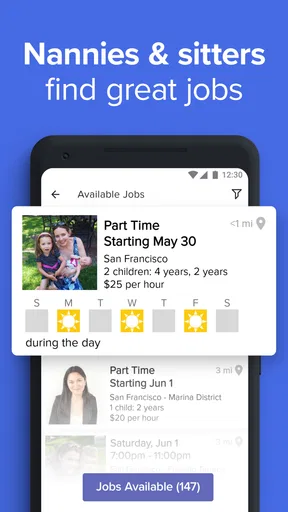
- Profiles include reviews, experience, availability, and hourly rates.
- In-app messaging helps coordinate schedules before booking.
- Useful filters help narrow searches by location and childcare needs.
- Booking and payment tools make arrangements more organized.
Limitations of UrbanSitter: Find Child Care
- Availability can vary greatly depending on your location.
- Popular sitters may be booked quickly, especially on weekends.
- Service fees can increase the total cost of occasional bookings.
- Some profiles may have limited reviews or incomplete information.
- Parents should still verify references and qualifications independently.
Similar Picks in This Category
View All
Family Space
Motorola Mobility LLC.3.9

شرطة الأطفال - مكالمة وهمية
Oub Apps4.1

Findmykids: Parental Control
LETEM LTD4.6

Pregnancy + | Tracker App
Philips Electronics UK Limited4.8

Policía de niños - para padres
Kids police4.7

Pregnancy App
Amila4.9
Frequently Asked Questions
What is UrbanSitter: Find Child Care, and how does it work?
UrbanSitter is a childcare marketplace that helps parents find and connect with babysitters, nannies, and other caregivers in their area. After creating a profile, you can search for available caregivers, review their profiles, experience, rates, availability, and parent feedback, then send booking requests or messages through the app. Availability and features may vary by location.
Are caregivers on UrbanSitter background checked and verified?
UrbanSitter may offer identity verification, background checks, references, reviews, and other safety-related information for participating caregivers, but parents should carefully review each profile and confirm the details themselves. Verification does not guarantee that a caregiver is suitable for every family. Before booking, discuss qualifications, childcare experience, emergency procedures, references, and any screening information shown in the app.
How much does childcare cost through UrbanSitter?
Childcare rates on UrbanSitter are generally set by individual caregivers and can vary according to location, experience, number of children, type of care, time of day, and requested responsibilities. Some caregivers may charge additional fees for transportation, late nights, holidays, or extra children. The app may also apply membership, booking, or service fees, so review the complete price before confirming.
Can I use UrbanSitter for recurring childcare or last-minute babysitting?
UrbanSitter can be useful for different childcare arrangements, including occasional babysitting, recurring schedules, date nights, school pickups, and sometimes short-notice requests. However, results depend on the caregivers available in your area and their calendars. For recurring care, communicate the expected schedule, duties, payment terms, cancellations, and trial arrangements clearly before accepting a long-term booking.
Is UrbanSitter available everywhere, and is the app free to download?
UrbanSitter can be downloaded at no cost, but access to certain features or the ability to contact and book caregivers may require a paid membership, service fee, or other charge depending on the current plan and location. The service is not available in every city, and the number of listed caregivers can differ significantly. Check local availability and pricing in the app before signing up.
